

Here's how to get your payslip

Your employer uses KLARA Payroll to process salaries. This means your payslip is now delivered securely and in encrypted form. Here’s how you can access it.

Two ways to receive your payslip

With or without the Post app – simply choose the option that works best for you.

ChatGPT-Bild 19. Okt. 2026, 15_58_03

With the Post app

  1. SwissID: Don't have a SwissID yet? Register for free at swissid.ch
  2. Post app: Download the Post app and sign in with your SwissID
  3. Email address: Make sure the email address used for your payslip is added and verified in the Post app. If it isn't, add it under “ePost – My digital mail” → “Profile” → “Personal details”.

Good to know
Your payslip will automatically appear under “ePost – My digital mail”. If notifications are enabled, you'll be notified when a new document arrives.

Lavendelfarbene Nachricht im Umschlag

Without the Post app: Via email

  1. Receive a notification: You'll receive an email when your payslip is ready.
  2. Request access: Scroll to the bottom of the email and click the link to request secure access.
  3. Open the second email: You'll receive another email containing your access link.
  4. Download your payslip: Open the link, accept the terms of use and save your payslip to your device.

Good to know
You don't need the Post app or a SwissID to access your payslip via the secure email link.
Want to go through the steps in more detail?

Our illustrated PDF guide shows you step by step how to securely receive and open your payslip.

Download the step-by-step guide

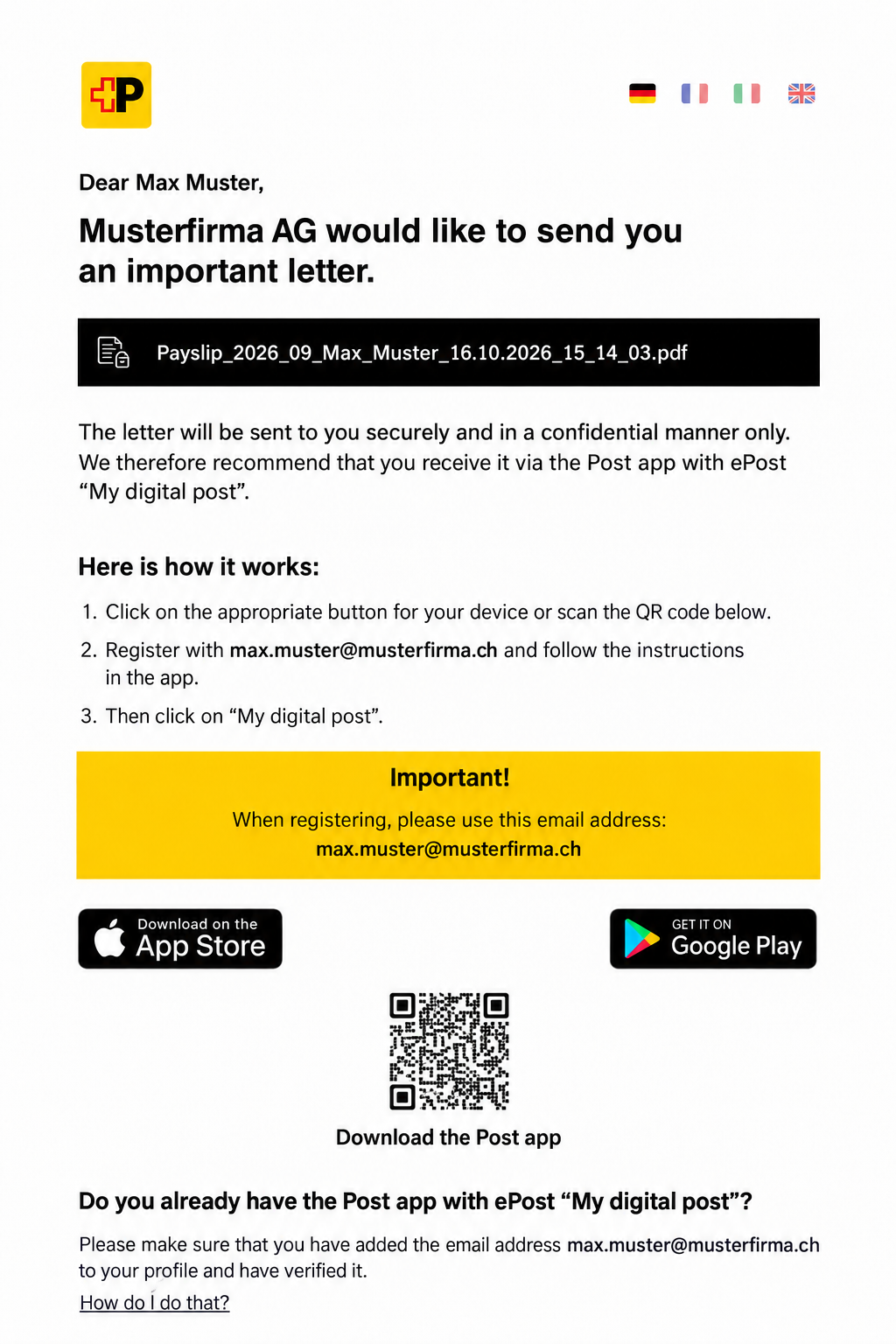
How to recognise your notification email

Here's what to look out for:

  1. The subject line includes your employer's name.
  2. The notification displays your payslip's filename alongside a lock icon.
  3. The email includes links to download the Post app from the official App Store or Google Play.

These details can help you recognise the notification, but they don't guarantee that an email is genuine. If you're unsure, contact your HR department before clicking any links.

EN Post-App-Benachrichtigung für Max Muster-1

Frequently Asked Questions

I don't have the Post app and don't want to install it. What can I do?

No problem. You can access your payslip without the app. Simply follow the instructions in the notification email.

I haven't received a second email after requesting access. What should I do?

It may take a few minutes to arrive. Check your spam folder too. If you still haven't received the email, visit Swiss Post's help page.

How do I know if the email is genuine?

You can compare it with the example shown above. If anything seems suspicious, contact your HR department before opening any links.

What if my email address is incorrect?

Contact your HR department. They can update your email address in KLARA.

Does receiving my payslip cost anything?

No, receiving your payslip is free of charge.

Are there any instructions?

Yes! You can download our illustrated PDF guide here.

Back to top
{}